How do we get our teams to use AI?
I think a lot of companies are starting in the wrong place.
They begin with a platform, a programme, a presentation and a proof of concept. Then they wonder why people carry on working exactly as they did before.
Using AI is not simply a software rollout. For many people it asks them to change how they think about a task, how they describe an outcome, how they handle information and how much initiative they are prepared to give a machine.
Some will worry that it will take their job. Some will worry that it will make their job worse. Some will be frightened of deleting something, exposing data or looking foolish in front of somebody who seems to understand all this.
That is not resistance to be crushed. It is the starting condition.
Do not begin by giving everybody an AI strategy. Give them a safe place to learn.
Start with one tool
Pick one approved tool or work harness and stick with it long enough for people to learn what it can actually do.
Do not begin with five models, twelve plugins and a long comparison of token prices. Give somebody a real but low-risk task:
- improve an email without sending it;
- summarise a public document;
- analyse a synthetic spreadsheet;
- turn meeting notes into a draft action list;
- or organise a folder of test information.
The outcome should be useful enough to matter and harmless enough to repeat.
A current work harness can go further than a chat box. It may work across documents, spreadsheets, files, code and connected tools. The product is not the main point. The important thing is that the team has one approved place in which to practise.
Build a playground before you build a motorway
If I were doing this in an office, I would create a test machine or a clearly isolated test workspace with a test identity.
It would have:
- synthetic or specifically approved information;
- no access to live customer records;
- no authority to send email, publish or make payments;
- no destructive access to shared folders;
- a visible reset and recovery route;
- and somebody named to answer questions.
People could sit down, try something and discover what happens without fearing that one bad instruction will damage the company.
This is not security theatre. It is how confidence is built. NIST's voluntary Generative AI Profile includes suggested actions on acceptable-use policies, risk-based controls and pre-deployment testing appropriate to the use case.
Start with a safe folder, not the keys to the building.
Give people time that belongs to learning
Then give people an hour or two each week to use it.
Not at midnight. Not as homework added to an already full role. Not as an innovation competition where confident early adopters make everybody else feel slow.
Give them protected time to bring one annoying task, try a route, show what worked and explain where they got stuck.
The skills problem is real. The OECD's 2026 review of AI and skills reports that around 40% of surveyed employers in manufacturing and finance that had not adopted AI identified skills as a barrier. More than half of SMEs not using generative AI did so too. It also says most workers do not need advanced AI engineering; they need digital and data literacy alongside managerial and human skills such as problem-solving and creativity.
Training matters, but it should be tied to the work. The same OECD review reports that workers who received training were more likely to report better job performance and working conditions. That is an association from survey evidence, not proof that any training course will create those outcomes. It is still a useful warning against buying licences and hoping adoption happens by itself.
Let the team build the use cases
Do not have a central team invent every workflow for everybody else.
The person doing the work knows where the friction is. They know which spreadsheet arrives late, which report is rebuilt each Friday, which email takes twenty minutes to phrase and which customer question requires three systems to answer.
Help them turn that knowledge into a small skill, instruction or repeatable workflow. Do not take it away and disappear for six months to build a corporate system around it.
OECD workplace case studies found separate examples of firms using worker consultation and training to support adoption. A French energy producer used training to show employees recurring uses and asked how AI could help them rather than simply imposing it through group policy. A US manufacturing case used job-specific training. These were qualitative cases from 2021 and 2022, not a universal recipe, but the direction feels right to me.
People support what they have helped to shape.
Pair domain knowledge with technical judgement
I would pair people across the old divide.
Pair a senior salesperson with an engineer. Pair an account manager with somebody who understands systems. Pair a lawyer with somebody who can reason about data access, integrations and audit. Pair operations with security before a useful experiment quietly becomes production.
The domain expert brings the work, the judgement, the customer context and the exceptions.
The technical person brings systems thinking, data boundaries, permissions, testing and an understanding of what may break when one tool starts talking to another.
Neither gets to sneer at the other.
The non-technical person has to learn enough about data, systems and security to work responsibly with these tools. The engineer has to learn empathy, communication and the actual human purpose of the workflow. Being able to solve a technical problem while making everybody else feel stupid is no longer a complete professional skill.
This is reciprocal training, not technical support.
Increase access one boundary at a time
Once somebody has shown that they can use the playground safely, increase access deliberately.
- Draft locally: use approved or synthetic files and produce work that a person reviews.
- Read a bounded source: allow access to one test mailbox, folder or data export.
- Create in a safe destination: let the system write drafts into a separate folder or account.
- Connect one business system: provide least-privilege, auditable access to a test CRM, document store or workflow.
- Turn repeated work into a skill: record the instructions, boundaries, checks and success condition.
- Promote only what proves useful: decide whether the local track should become shared company infrastructure.
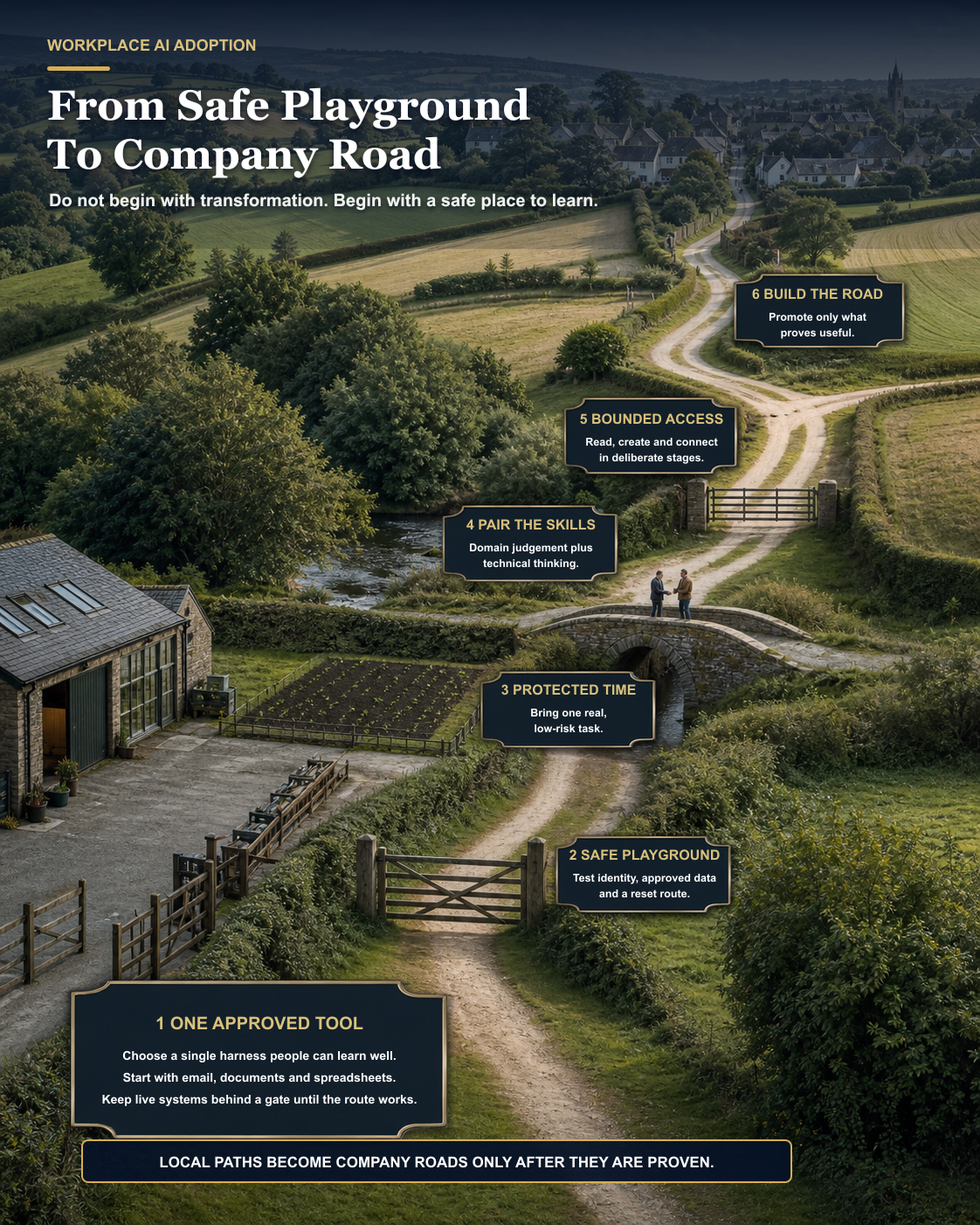
Every increase in authority should come with a receipt: what can this identity read, what can it change, what is logged, who reviews it, how is it stopped and how is the last good state recovered?
Access should follow demonstrated need, not enthusiasm.
Your IT team becomes part architect, part coach
As adoption grows, teams will create paths between email, files, CRM, finance, operations and external tools.
I think of it like a road network.
At first somebody creates a footpath because they need to move one piece of information from one place to another. If more people use it, perhaps it becomes a maintained lane. If it becomes important to the company, it may need identity controls, monitoring, ownership, recovery and a proper service boundary.
IT should be able to see those paths without automatically closing them. Its role is to help the useful routes become safe, shared infrastructure and to stop dangerous shortcuts before they become invisible dependencies.
That means keeping an inventory of tools, identities, data connections, reusable skills and operational owners. It also means listening. The audit trail is there to help the company learn, not merely to catch somebody doing something new.
Measure changed work, not licence activation
A licence being active tells me almost nothing.
I would measure:
- how many people completed one useful task safely;
- which tasks were repeated because they genuinely helped;
- time saved after review and correction;
- quality, error and rework rates;
- how many local experiments became maintained workflows;
- how quickly a person could stop or recover a failed run;
- and whether people felt more capable or merely more monitored.
A field study of 5,179 customer-support agents found that access to a generative AI assistant was associated with a 14% average productivity improvement, with larger gains among novice and lower-skilled workers. That was one specific company, workflow and tool; it is not a promise for every business. The authors described the evidence that AI could spread effective practices as suggestive, not conclusive.
DORA's 2025 software-development research uses a phrase I like: AI acts as an amplifier. It magnifies the strengths and weaknesses of the system around it. That research concerns software delivery, but I think the operating lesson travels. If your data, ownership and communication are confused, AI helps you produce confusion faster.
The proof of concept is not failing because people are stupid
In my experience, an AI proof of concept can fail for reasons that have little to do with the model.
The technology may not be good enough. The task may be badly chosen. Or the organisation may have supplied a tool without changing access, training, time, incentives, ownership or the way technical and domain teams work together.
You cannot use yesterday's operating model and expect tomorrow's capability to appear inside it.
My recommendation is simple:
- Choose one approved work harness.
- Create a safe test identity and workspace.
- Give people protected learning time.
- Let them bring real, low-risk work.
- Pair domain expertise with technical judgement.
- Add access one auditable boundary at a time.
- Turn proven experiments into maintained company roads.
Do not build a giant wrapper to protect people from ever learning how these systems work. I expect the interfaces and the useful work to keep changing.
Build people's capability. Build the safe environment around them. Then learn your way into the operating model together.
AI adoption is not installing a tool.
It is changing how the company learns.
Related reading
- Start With A Safe Folder, Not A Live System
- Give The Agent A Desk, Not The Keys
- Management Is The Missing Literacy
- Your AI POC Needs Time, Not Just Technology
- The Hackers Are Already Using AI. Your Developers Should Be Too.
Sources and notes
- OECD: AI and skills
- OECD: The impact of AI on the workplace - evidence from case studies
- Brynjolfsson, Li and Raymond: Generative AI at Work
- DORA: State of AI-assisted Software Development 2025
- NIST: Artificial Intelligence Risk Management Framework - Generative AI Profile
This is a practical adoption model, not legal, employment, security or procurement advice. Access, monitoring and training arrangements should be proportionate to the organisation, its people, its data and the consequences of failure.