The first mistake is to make this a tool argument.
Should we use Claude Code? Codex? Copilot? Perplexity? The next thing with a better demo and a more confident landing page?
Useful question. Not the first question.
The first question is: what shape of work are we allowing an agent to do?
If the answer is "everything", you have not made an AI strategy. You have made a bet that the tool, the user, the data, the permissions, the network, the prompts, the dependencies, and the organisation's judgement will all behave perfectly at the same time.
That is not how I would start.
I would start with a safe folder, not a live system.
The Tool Is Not The Control
This is the bit I think gets missed.
People ask which agent they should introduce, but the safer and more useful question is: what is the operating pattern around the agent?
Some tools call the project rules AGENTS.md. Some use CLAUDE.md. Some use project instructions, skills, workspaces, policies, notebooks, or admin settings. The name changes. The job is the same.
The rule file is there to say: this is where you may work, this is what you may read, this is what you may change, this is what you must ask about, and this is what a human will review before anything becomes real.
The control is not the logo on the button.
The control is the shape of the work.
This sits next to Give The Agent A Desk, Not The Keys. That piece is about access. This one is about rollout.
This Is Not Just Chat
A lot of organisations still think about AI as a chat box. You ask a question, it replies, and you decide whether the answer is useful.
That is one surface.
But agentic development tools and workspace agents are different. They can inspect folders. They can read files. They can prepare diffs. They can run commands. They can make a mess quickly if the surface is too wide and the human is too casual.
That does not mean you should panic.
It means you should introduce them as supervised project assistants, not as unattended operators.
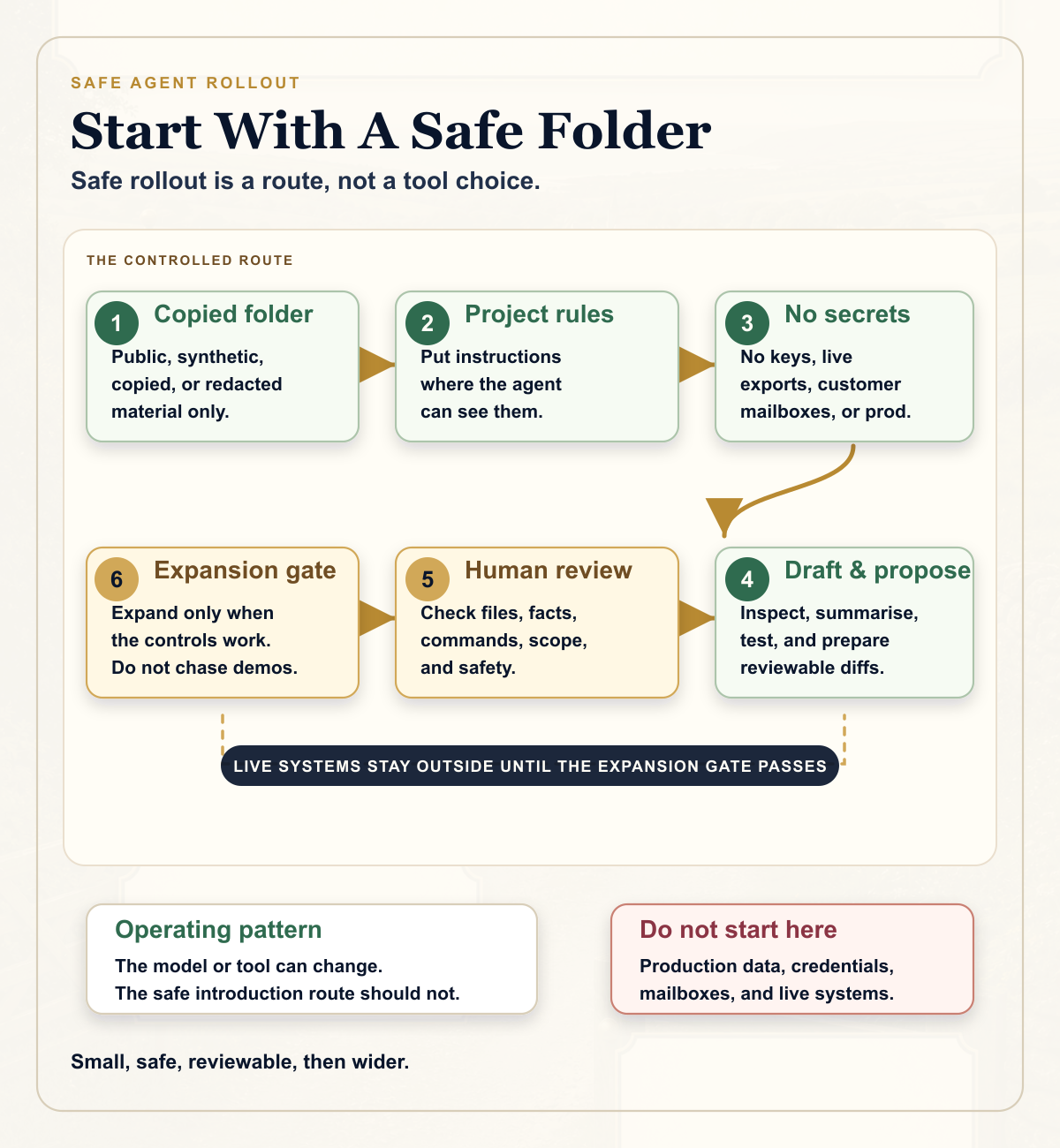
Start With A Copied Folder
The first workspace should be boring.
Not the live repo with deployment credentials. Not a shared drive full of old client files. Not somebody's actual inbox. Not the HR folder. Not the production database.
A copied local project folder.
agent-pilot/
  README.md
  AGENTS.md
  inputs/
  notes/
  outputs/
  archive/
The material inside should be public, synthetic, copied, redacted, or deliberately selected for the pilot. The point is not to hide the real work forever. The point is to learn the control pattern before you attach the agent to work that can hurt people, leak information, spend money, publish publicly, or change production.
Start small enough that a human can understand every file in the folder.
Write The Rules Where The Agent Can See Them
The project instruction file should not be a legal essay. It should be clear enough for a busy person and specific enough for the agent.
For a first pilot, I would include rules like these:
- Work only inside this project folder.
- Use only the files provided here unless a named human approves more.
- Do not look for private folders, broad exports, mailboxes, credentials, or live systems.
- Inspect first and propose a plan before substantial changes.
- Do not publish, send, delete, install, deploy, or alter live records without named human approval.
- Summarise what you read, what you changed, what checks you ran, and what still needs human review.
That is not bureaucracy. That is how you turn a clever tool into a controllable working surface.
Classify The Material Before It Goes In
Do not solve information governance after the agent has already read the folder.
Decide the category first.
Public material is the easiest starting point. Public website pages, public policies, open documentation, product descriptions, synthetic examples, and deliberately prepared training packs are good first surfaces.
Internal material can come later, once people understand how the tool behaves and how review works.
Restricted material needs explicit approval, access controls, and a human who understands the consequence of using it.
Secrets do not belong in ordinary agent prompts or pilot folders. No API keys. No private keys. No recovery codes. No deployment credentials. No environment files with live values. No banking details. No convenient little text file called "tokens".
The easiest leak to prevent is the one you never put in the workspace.
Good First Tasks
The best first tasks are useful, low risk, and easy to check.
- Inspect a safe folder and summarise what is inside.
- Create a README from public notes.
- Turn a public policy into a checklist.
- Build a tiny validation script using synthetic data.
- Review a diff and explain the likely risks without editing.
- Draft a briefing note from approved source material.
These tasks teach the organisation how the agent reads, reasons, edits, and reports back. They also teach staff how to supervise it.
That is the point of the first phase. Not maximum productivity. Supervision literacy.
The Human Rule
The agent may inspect. The agent may draft. The agent may propose changes. Humans review, approve, commit, publish, and deploy.
You can change that rule later, but it is a very good starting rule.
It gives anxious people a real boundary. It gives enthusiastic people a brake. It gives leaders a way to say yes without pretending there is no risk.
The review should be practical:
- Did it stay inside the approved folder or repo?
- What did it read?
- What did it change?
- Did it use the network?
- Did it install anything?
- Did it touch sensitive or out-of-scope material?
- Are the facts supported by the source files?
- What checks were run?
- Is a named human happy for this to be shared, committed, published, or used?
If staff cannot answer those questions, the pilot is not ready to expand.
The First Thirty Days
I would not start with a grand programme.
I would start with thirty days.
In week one, pick the first safe surface. Define the information categories. Create the folder. Write the instruction file. Choose the pilot users and the reviewers. Pick one public or synthetic task.
In week two, practise. Run read-only inspection. Make one small edit. Review the changed files. Reject something. Revert something. Learn what people find scary, boring, useful, or confusing.
In week three, run three to five low-risk tasks. Record the source, prompt, files, commands, checks, reviewer, decision, and any change to the rules.
In week four, decide. What helped? What surprised you? What nearly went wrong? Did the tool stay in the box? Could people review the work? Is the next use case still low risk?
Then expand because the controls work, not because the demo was impressive.
Who Needs To Be In The Room
This is not only an IT decision.
You need an operational owner who knows the work. You need IT or security for access and tooling. You need privacy, compliance, or data protection where personal or regulated information might appear. You need HR or learning if staff are being trained. You need the technical owner if code or systems are involved.
Sometimes you need legal, safeguarding, finance, communications, or a board owner.
That sounds like a lot. But the conversation can be short if the surface is narrow.
"We are testing one copied folder, with public or synthetic material, no secrets, no live systems, and human review before use."
That is a sensible sentence.
What Not To Give It
For an ordinary first pilot, do not give the agent:
- Passwords, API keys, tokens, private keys, or recovery codes.
- Deployment credentials or production environment variables.
- Live payment, banking, HR, safeguarding, health, legal, or disciplinary records.
- Confidential customer, client, patient, member, staff, or student records.
- Live database dumps.
- Whole private mailboxes.
- Broad shared-drive exports.
- Access to systems that send, publish, delete, deploy, or alter live records without approval.
This is not anti-AI. It is pro-operating discipline.
The Adoption Signal
The signal I would look for is not "the tool produced something clever".
The signal is: did the organisation learn how to use an agent inside a boundary?
Could the user explain what happened? Could the reviewer check it? Did the rules improve? Did the next run become easier? Did the pilot reveal a better way to describe the work?
If yes, you have something to build on.
If no, you have learned early, while the surface was still small.
The Point
You can use Claude Code. You can use Codex. You can use Copilot. You can use Perplexity. You can use whatever comes next.
The vendor choice matters, but it is not the first layer of safety.
The first layer is the work shape.
Start with a safe folder.
Use safe material.
Write the rules.
Review the changes.
Expand only when the controls work.
That is how you introduce agents without pretending they are harmless toys or fully trusted colleagues.
They are neither.
They are powerful working tools. Give them a proper place to work.