I was reading that Codex is coming to Linux, and my first thought was very simple: this changes the Mac mini equation.
For the last year or so, a Mac mini has been a rather lovely answer when somebody wants a dedicated machine for agentic work. It is compact, quiet, dependable and easy to leave running. You can keep the agent away from your everyday computer, give it a bounded workspace and connect to it remotely.
I have considered buying another one myself.
But on 11 August, an OpenAI Developer Community staff announcement said that the ChatGPT desktop app for Linux was entering preview. It brings ChatGPT, Work and Codex together, with packages for Ubuntu 24.04 and 26.04 LTS, Debian 13 and Fedora 43 and 44, on both x64 and ARM64.
That sounds like a product update. I think it may be the beginning of a hardware change.
Once the harness runs well on Linux, the dedicated agent computer no longer has to be a Mac.
Codex was already on Linux
There is an important distinction here.
The open-source Codex command-line interface already supported Linux. Developers have been able to run it in a terminal, inside containers and on remote servers for some time.
The new part is the desktop work surface.
OpenAI describes the wider Codex experience as a command centre for coding work, with projects, skills, scheduled background work and the same agent available across ChatGPT, editors and terminals. The unified desktop app also brings files, browser workflows and computer use into the working environment.
That matters because the model is only part of what makes an agent useful. The harness holds the projects, permissions, tools, files, browser, history and operating conventions around it. I have written before that the AI harness is becoming the operating system. Linux support makes that argument more literal.
If most of my day is now in Codex and a browser, how much of the underlying desktop operating system am I actually buying?
The Mac mini was solving a real problem
This is not an argument that the Mac mini has suddenly become a bad computer.
People bought them because the complete package was good. Apple supplied the hardware, operating system, power management, updates, drivers, security integration and support model. The machines were small enough to put on a shelf and capable enough to do serious local development work.
For people already living in the Apple ecosystem, a Mac also handles iCloud, Messages, Keychain, Apple development tools and other macOS-specific work. A Linux box does not replace any of that by wishing very hard.
But if the machine's job is narrower, perhaps running Codex, checking repositories, using a browser, running tests and carrying out scheduled work, the operating-system dependency becomes smaller.
That opens the market to a large range of x64 and ARM64 machines. It also makes it easier to dedicate one machine to one business, client or risk boundary without paying the Apple price each time.
What can you buy today?
Prices move, sales end and specifications differ, so this is a dated illustration rather than a buying recommendation.
| Option | Listed price | What the listing says | Important qualification |
|---|---|---|---|
| Apple Mac mini | From £799 | Current UK entry price on Apple's Mac shop | Complete Apple hardware and macOS package; exact performance depends on the selected model and configuration |
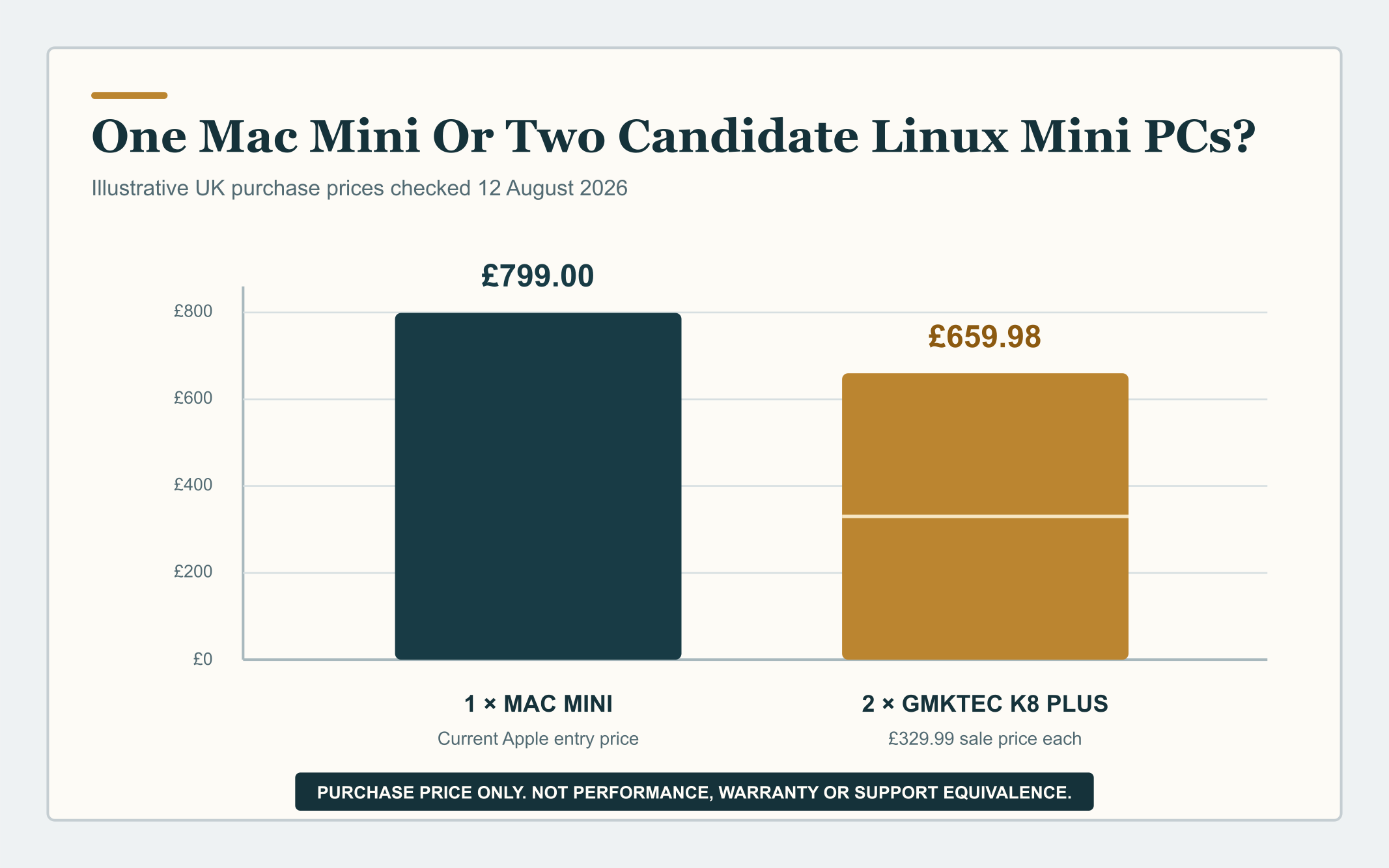
| GMKtec NucBox K8 Plus | £329.99 sale price | Ryzen 7 8845HS, 32GB memory and 1TB storage on the checked vendor page | Candidate Linux host, not a performance-equivalent Mac replacement; verify the selected variant, Linux drivers, delivery, duties and warranty before buying |
On those exact listings, two of the candidate mini PCs cost £659.98. That is £139.02 below one entry Mac mini. Three cost £989.97, so the answer is two, not three.
Apple's 2024 M4 Mac mini announcement started at £599 in the UK. The current entry price is £200 higher than that historical launch price. That is not a like-for-like specification comparison, and Apple has not published the future price Tony will face when he next buys one. It simply explains why a current £799 starting point makes alternatives more interesting.
The GMKtec price is also a sale price from one vendor. Its UK site says products may ship from China, gives a 7 to 14 day delivery estimate and describes a one-year limited warranty. A bargain becomes less attractive if the configuration is wrong, a Linux driver is unreliable or recovery means shipping a machine across the world.
The cloud version already exists
You do not necessarily need to buy a box.
Hostinger offers WebTop, a persistent Linux desktop that runs in a browser on one of its VPS plans. Its current UK page lists the KVM 2 plan at £6.79 a month for the introductory term and £12.99 a month on renewal, before VAT. The listed allocation is two virtual CPU cores, 8GB of memory and 100GB of storage.
Hostinger also documents an Ubuntu desktop using XFCE with VNC or RDP. So yes, a hosted Linux desktop that you can reach remotely is already practical.
| Service | Introductory price | Renewal price | Boundary |
|---|---|---|---|
| Hostinger WebTop on KVM 2 | £6.79 per month | £12.99 per month | Paid upfront for the applicable term, excluding VAT; self-managed VPS rather than a managed corporate desktop |
It is not the same as a local computer. A remote desktop has latency. It does not automatically have access to local files, devices or private networks. Somebody still owns patching, identity, credentials, backups, firewall rules and recovery. Exposing VNC or RDP directly to the public internet is not a sensible operating model.
I would use a regular unprivileged account, SSH keys, a private VPN or tunnel, encrypted secrets, restricted network access, backups and a tested rebuild route. Being cheap and always on does not make a machine safe.
Three useful choices

I think the choice now looks like this:
1. A local Mac
Choose it when you need macOS, Apple development tools, local Apple integration, predictable hardware support or the lowest setup friction. It remains a strong, boring and useful answer.
2. A local Linux mini PC
Choose it when you want a lower-cost dedicated agent machine, a wider hardware choice, local speed and a clear physical boundary. Accept that you are now responsible for the Linux installation, driver compatibility, remote access and a little more systems administration.
3. A hosted Linux desktop or server
Choose it for scheduled work, remote access and an always-on worker that does not depend on the laptop being awake. Keep sensitive local work away unless the identity, network and data boundary have been designed deliberately.
The spread of Linux through SteamOS devices is another sign that Linux is becoming less exotic as a consumer operating environment. It does not prove that every desktop application will work perfectly. It does mean the hardware, driver and user-experience base is broader than it used to be.
Do not buy the processor and forget the system
A frontier model may run in somebody else's data centre, but the local machine still has work to do. It may be running a browser, checking out several repositories, building containers, executing tests, processing files and keeping logs. Local memory, storage and network reliability matter.
Before buying a dedicated agent machine, I would check:
- the exact supported Linux distribution and processor architecture;
- at least enough memory for the browser, development tools and concurrent jobs;
- fast, replaceable storage with enough room for repositories, containers and logs;
- wired networking where reliable remote operation matters;
- Linux support for networking, graphics, sleep and firmware updates;
- full-disk encryption and a protected secrets store;
- a non-administrator account for routine agent work;
- automatic security updates with a controlled restart policy;
- remote access through a private, authenticated route;
- observable logs and clear spending limits;
- backups of the information that matters;
- and a written, tested rebuild procedure.
The cheapest machine is expensive if it fails silently for a week or nobody knows how to restore it.
Could OpenAI make a Linux device?
Possibly. But there is no public OpenAI announcement of a Linux desktop computer in the sources I checked.
My prediction is narrower.
The next six to nine months of the Linux preview will give OpenAI real evidence about distributions, drivers, packaging, browser behaviour, remote sessions, enterprise controls and the ways people dedicate machines to agents. It may encourage hardware partners to sell certified or preconfigured agent workstations. OpenAI might eventually choose to make or endorse hardware.
That is a reasonable path to imagine. It is not a product announcement.
What I would do now
I would not cancel every Mac mini order and buy the cheapest small computer on the internet.
I would take one representative Linux machine and run a proper pilot.
- Install one of OpenAI's supported Linux distributions.
- Run the same Codex projects and browser workflows used on the Mac.
- Measure task success, local build time, remote reliability and human support time.
- Test updates, sleep, reboot, credential rotation, backup and complete rebuild.
- Record what remains macOS-specific.
- Then compare the cost of a recovered, supported outcome, not merely the purchase price.
I was considering another Mac mini. I am now considering a Linux box as well.
That is the immediate significance of this preview. OpenAI has not made the Mac mini irrelevant. It has made the dedicated agent machine a competitive category.
Once the work surface travels, the hardware underneath it becomes a choice.
Related reading
- The AI Harness Is Becoming The Operating System
- Use The Harness. Keep The Escape Route.
- Engineers Are Not Just People Who Write Code
- How Do We Get Our Teams To Use AI?
Sources and notes
- OpenAI Developer Community staff announcement: Codex in the ChatGPT desktop app for Linux is now in preview
- OpenAI: Codex
- OpenAI: ChatGPT for your most ambitious work
- OpenAI GitHub: Codex CLI
- Apple UK: current Mac starting prices
- Apple: 2024 M4 Mac mini launch price
- GMKtec UK: NucBox K8 Plus product listing
- Hostinger UK: WebTop Linux desktop
- Hostinger: Ubuntu remote desktop setup
- Valve: SteamOS
Product support, prices, taxes, promotions and availability can change after the evidence date of 12 August 2026. Vendor listings are evidence of the checked offer, not an endorsement. Test exact hardware, software and security requirements before purchasing or deploying.