Give Grok Bot one useful job. Get a result you can check. Then teach it how to do that job better.
That is where I would start. It is tempting to create a chief of staff, a research department and several impressive job titles before anyone has produced anything useful. We have enough organisational theatre already.
I have written about why Grok Bot interests me as a leader and using it to get my briefing workflow running. This is the practical companion: what the main parts mean, how they fit together and what I would ask them to do.
The starting point was Nate Herk's video, Every Grok Bot Concept Explained for Normal People. It is a helpful tour. I have checked the product details against the current documentation and turned them into a business example you can adapt.
The parts, in plain English
This guide is about the Grok Bot application, with its ongoing agents and working computer. The useful thing to understand is how its different parts contribute to a job.
| Part | What it means | In our meeting example |
|---|---|---|
| Bot | A named assistant with an ongoing role. | Prepare me for partnership meetings. |
| Context and memory | The information available for the task, and useful background retained over time. | The current meeting papers and my preference for short briefs. |
| Computer and connectors | Ways to work with websites, files and applications. | Read approved notes and check the partner's public website. |
| Skill | A saved method for doing a task. | Our agreed meeting-preparation process. |
| Routine | A scheduled workflow, or one started by a supported event. | Prepare the brief before a regular meeting. |
| Group and handoff | Ways for Bots to coordinate work. | A researcher gives findings to the Bot preparing the brief. |
The product overview explains the overall model. The examples below are suggested working methods, rather than a claim that I have tested every feature.
1. Give your first Bot a proper job
Choose New, then Create new Bot. Edit its profile to give it a name and description. The Bot guide explains the current desktop steps.
I would call this one Meeting Preparation. Give it a description that explains its responsibility, the result you expect and the point where it stops:
Prepare concise briefs for my partnership meetings. Use the sources I approve, show what has changed and identify questions worth asking. Link important claims to their sources. Leave unknowns visible. Prepare drafts for my review; ask before sending messages or changing shared records.
Keep lasting rules in the description. Put the date, participants and purpose of a particular meeting in that meeting's request. Otherwise, next month's meeting can inherit last month's assumptions.
2. Give it the background it needs
For the first attempt, I would provide a small set of approved notes and public links. Give it the purpose of the meeting, who is attending and the decision you hope to make.
Context is the material available for the current work. Memory helps retain useful background between tasks. The documentation describes Bots retaining preferences and important facts, while advising readers to check current sources for consequential decisions. Memory guidance.
“I prefer a one-page brief in British English” is a useful lasting preference. “The contract expires next month” needs a current contract and an actual date.
Herk's tutorial discusses shared and individual memory, and automatic shortening of long conversations, often called compaction. I would avoid designing a business process around an assumption that every detail remains available forever. Ask what the Bot has retained and correct it when necessary.
Keep the current brief, decisions and agreed actions in a document you control. Ask each new run to read that document. This gives you something you can inspect, correct and carry to another tool.
3. Understand the computer before connecting everything
Grok Bot works on a persistent cloud computer with a browser, files and a terminal for running commands. Cloud work can continue after you close your laptop. Your personal Bots have separate screens but share the account's computer, files, signed-in browser sessions and command-line credentials. Computer and apps guide.
That makes handoffs useful. It also means calling one Bot “Board A” and another “Board B” does not separate those companies' information. I would use an arrangement approved for each company's data.
Access to your own laptop is a separate capability with its own permissions. Giving a Bot a local file path does not, by itself, establish that it can access the file. Start with a deliberately chosen attachment or approved folder. Local-computer controls.
For the meeting example, public pages and the notes I supply are enough to begin. It can earn a reason to need more access.
4. Connect the application the task needs
Connectors give Bots a structured way to use supported applications. They are installed through Connect apps; complete the requested sign-in and check which account you are connecting. The documentation recommends connectors where available, with browser use for other work. Installed connectors are available across your personal Bot roster. Connecting apps.
I would connect the relevant calendar or document service only when the meeting task needs it. Check whether access is read-only or also permits changes, and whether it reaches personal or company information.
If a website needs a password or verification step, use the handover or supported secure-input flow. Keep passwords out of ordinary chat. Browser sessions can expire, so a process also needs a sensible response when a login stops working.
5. Run the first task yourself
Here is a request I would try once the approved sources are available:
Prepare a one-page brief for Thursday's partnership meeting. Use the notes and links I have supplied. Cover the meeting's purpose, what we agreed last time, relevant changes since then, three questions worth asking and any information we still need. Link each important observation to its source. Distinguish facts from your suggestions. Save the brief in our agreed meeting folder and show it to me here. Do not send anything or change the action list.
Then read it. Follow some links. Check that the supposed agreement was actually an agreement. Ask whether the questions help you think.
Give specific feedback: “That was a possibility, not a commitment.” “Show the date of each source.” “Put the unresolved commercial question at the top.”
This is where you discover what a good result looks like. Capture those corrections before asking it to repeat the work.
6. Save the useful method as a skill
A skill is a reusable set of instructions. In the desktop composer, / references a saved skill; @ references Bots and other supported items. Skills documentation.
After improving the brief, I would ask:
Save the meeting-preparation method we have agreed as a skill. Include the approved sources, how to identify the right meeting, the brief's structure and our corrections. Require source dates and links. If notes conflict, show both accounts. If something essential is unavailable, say what is missing. Keep messages and record changes for my approval.
Read what it saved. A useful skill should let you recognise the right result and spot a failure. Include how to handle an empty source, an ambiguous company name and a previous meeting that never happened.
When a run disappoints you, improve the saved method. Otherwise, you can spend every week giving the same correction.
7. Show it a task when the clicks matter
Where Teach a task is available, you can demonstrate a browser workflow and review the skill created from it. Availability can vary. Written instructions remain an alternative. Teach-by-demonstration guidance.
This could help with an awkward reporting screen. Show the right report, date range and download. Then explain the judgement the clicks do not reveal: which company to select, why cancelled meetings are excluded and when to stop.
Test the resulting skill on another safe example. One successful demonstration gives you a starting method to examine.
8. Make the reliable process a routine
A routine starts a workflow on a schedule. Ask the Bot that should own it, then check the schedule, time zone and next run. The cloud environment supports background runs. Routine setup.
Every weekday at 07:30 Europe/London, check for partnership meetings in the next two working days. Run our meeting-preparation skill for meetings without a current brief. Leave the result in this conversation and our agreed folder. Report missing sources. Keep any messages or changes to shared records for my approval.
Make “current brief” precise in the skill: identify the meeting, note when the brief was prepared and check what changed afterwards. That is how I would avoid a growing folder of duplicate briefs.
Check a test run before relying on the schedule. The vendor warns that tests perform real work, so use safe inputs. Inspect the result and recent run history, including failures. The current minimum routine interval is five minutes; the tutorial's one-minute demonstration should not be copied as today's limit.
9. Let an event start work when that makes sense
A schedule asks for work at a particular time. An event starts it when something happens. A webhook is a way for another system to send a notification and some data.
The tutorial demonstrates a form-to-webhook workflow. Current documentation also describes supported event integrations, such as Slack messages or GitHub notifications, and says these can require a separate connection from the ordinary plugin. Check the event your account actually supports. Event-trigger documentation.
For example, a partnership request could start a proposed workflow: record the request, research the organisation and draft a response for a person to review.
I would give each request a stable identifier and check for an existing job before creating another. I would also treat incoming text as information to assess. A form submission should not be able to grant the Bot new instructions or access.
10. Build a small family when the work needs one
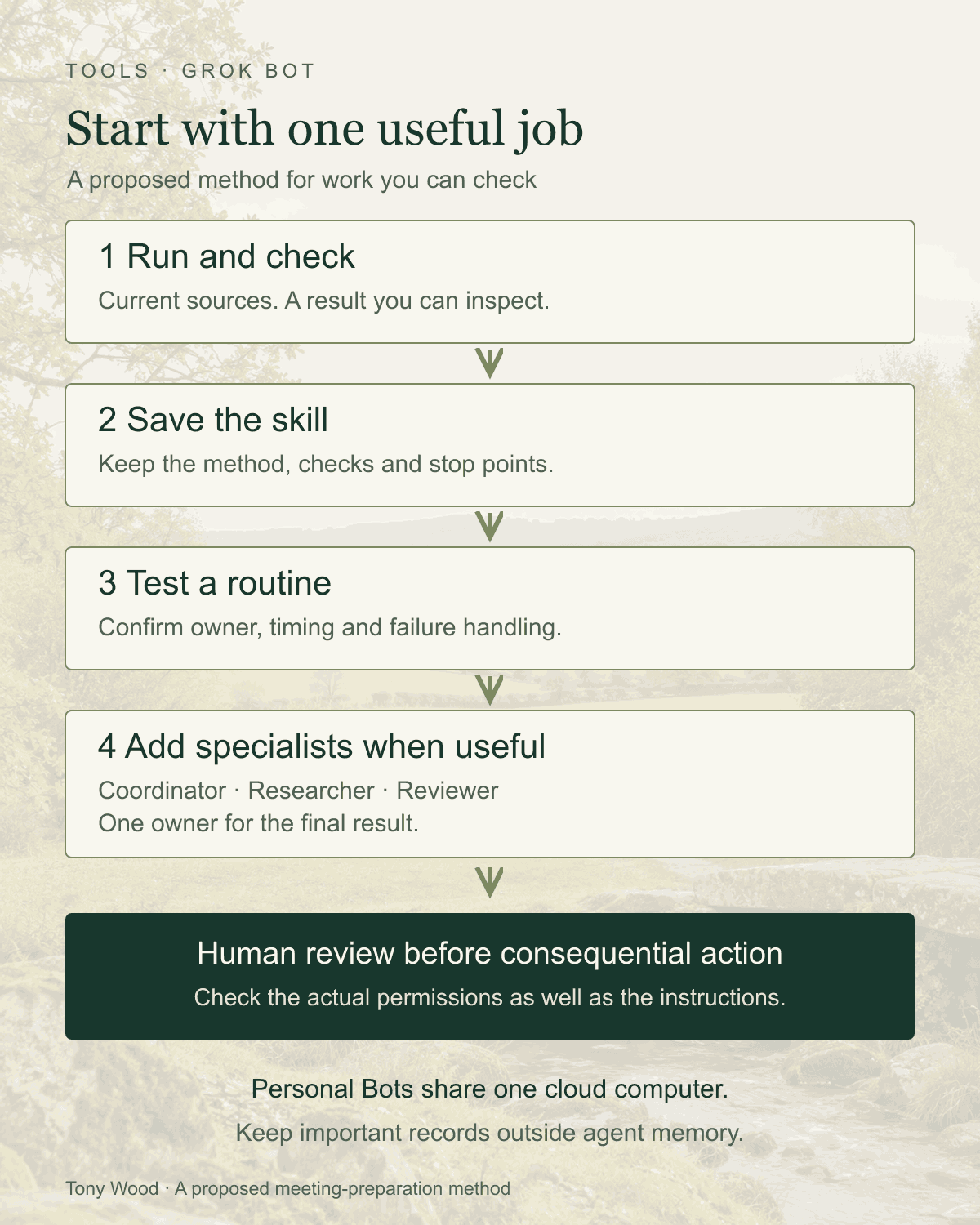
Once one Bot handles the meeting brief well, a small family could help with a broader job:
- A coordinator owns the brief and brings me one coherent result.
- A researcher finds relevant material, checks dates and links the evidence.
- A reviewer challenges the draft and identifies gaps or unsupported claims.
Give the coordinator the outcome and a clear route for handing work to the specialists. In a group chat, use @ to direct a request. Bots can also message one another, with handoffs visible in the conversation; team policy can restrict this. Messaging and collaboration.
Coordinate the partnership brief. Ask Researcher for current evidence and Reviewer to challenge the draft against those sources. You own the final brief. Give each specialist a defined question and output. Return the brief, unresolved differences and links to their work. Ask me before adding Bots, changing records or contacting anyone.
A second Bot reviewing the first is another check, rather than independent human judgement. I would still inspect the important sources.
Agree who may update each working document. If several Bots can all rewrite the final brief, the last one to save can quietly become the editor-in-chief.
For feedback on a particular result, reply to that message. The interface supports focused replies, voice and dictation too. Use whichever helps you give a clear instruction; check names and dates before sending dictated requests.
11. Know what you are copying or sharing
A template lets someone start from shared Bot configuration. Importing one creates their own copy; it does not transfer your computer, logins or conversation history. Check its instructions, included material and requested connections before using it.
Duplicate has different rules: current documentation says it copies the profile, settings, enabled skills and routines, but excludes conversation history, learned memory and attachments. Give a copy its new scope and context. Copying and sharing Bots.
A Team Bot is a separate shared product arrangement: colleagues can use one maintained Bot, with team knowledge and private notes for each person. Its computer and connector rules depend on the conversation. Read the Team Bot guide before treating a personal family as a company service.
12. Know where the information and authority sit
The practical picture is a cloud working environment, retained Bot context and connected source applications. The documentation identifies a shared /workspace folder for durable files. Your own laptop remains separate. Files and the cloud computer.
The product requires data storage and uses Cursor account privacy settings. Training choices do not answer every question about retention, backups or hosting location. These sources do not establish a UK-only or EU-only residency guarantee for your workload. Check the applicable terms and company approval before adding confidential board material. Data and account guidance; Cursor security information.
Put important approval boundaries in the actual controls as well as the request. Auto Review can evaluate proposed actions and apply ask-first rules; it is model-based. Check the account permissions underneath it. I would keep external messages, spending and important record changes for human approval. Approval controls.
For Team Bots, check the shared-channel exception: where nobody can answer an approval card, Auto Review can be absent unless the team requires it. That makes the permissions granted to the Bot particularly important. Team Bot approval behaviour.
Deleting a personal Bot does not clear shared files or browser sessions. Revoke connections and remove working data deliberately when the job ends. Hiding a Bot does not pause its routines. Removing access; Hiding and deleting Bots.
13. Keep a working record you can inspect
I would keep a simple approved task register alongside the important work: request, owner, sources, status, output link and anything waiting on me.
Use precise states. “Brief drafted” is different from “brief checked”. “Follow-up prepared” is different from “email sent”. Ask for the evidence behind a completion claim.
A document or sheet is enough to begin. Keep the record somewhere you are comfortable letting the Bot update, with a clear boundary around those updates. This also helps you see repeated failures instead of rediscovering them in conversation.
Check usage while you learn. Current billing depends on the account and plan; included usage refreshes weekly, and extra work may draw on paid credits or on-demand usage. Read the current plans guide and set the relevant spending controls before adding frequent routines.
Notifications can help you notice completed work and requests for input. Configure them for the Bots you actually need to hear from. The settings guide explains the controls.
Where I would use this as a founder, leader or board member
As a founder, I would adapt the method to customer discovery: prepare for conversations, compare what people actually said and identify questions still worth testing. Keep evidence separate from enthusiasm.
As a leader, I would use it for meeting preparation and follow-through. Show me the commitment, its owner, the agreed date and what has changed. Leave dates unknown when nobody agreed one.
As a board member, with an approved information setup, I would ask it to compare papers and prepare better questions. Show the page, the measure and the period behind an apparent discrepancy. I would still read the papers and form my own view.
These are working patterns to test. Their value depends on the quality of the sources and the time you spend checking the result.
What I would do in the first week
Choose one real meeting. Create one Bot. Give it a small, approved source set and a clear description of the brief you want.
Run it, correct it and save the method. Try the skill on a different meeting before scheduling anything. Record the time spent checking and correcting, whether the brief missed something important and whether it helped you ask a better question.
Then decide whether a routine or specialist Bot has earned its place.
That is the connection to Shepherd of Agentic Sheep: useful context, work within clear limits and evidence of what happened. Build enough of a family to do the work, and give yourself fewer things to chase.
Sources and notes
Prepared for the Tools series on 17 October 2026. The starting tutorial is Nate Herk's Every Grok Bot Concept Explained for Normal People, published 1 September 2026, read through the supplied Recall card. Its commercial description includes promoted resources and services. It provides examples, rather than an independent reliability or security test.
Product facts were checked against the vendor's current overview, Bot management, computer and connectors, skills and routines, collaboration, approvals and privacy, Team Bots, settings and plans documentation. Features and account availability can change.
The prompts and meeting workflow are editorial proposals. This article does not report a new hands-on product test. The earlier briefing article is my separate personal account.