OpenAI is no longer one chat box.
That is the simplest way I can explain the latest release.
There are now different models, different places to use them, different tools they can reach, and different amounts of thinking you can ask them to do. That is powerful, but the names can make the whole thing feel much more complicated than it needs to be.
So this is my plain-English map.
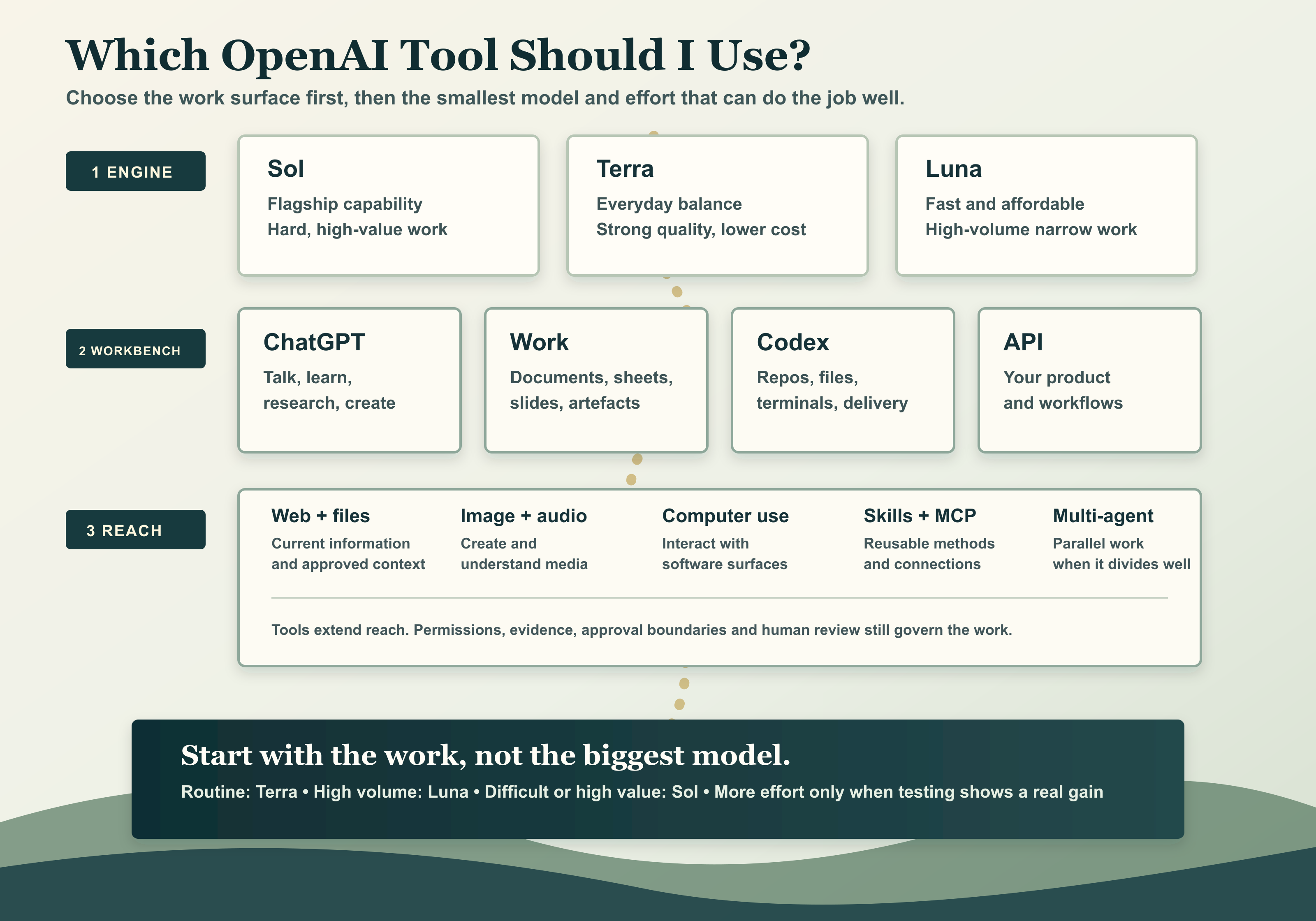
Think of it in three layers:
- The model is the engine.
- The work surface is the workbench.
- The tools and connectors are the hands and access.
Once you separate those three things, it becomes much easier.
The latest release: GPT-5.6
On 9 July 2026, OpenAI released the GPT-5.6 family for general availability. The family has three main tiers: Sol, Terra, and Luna.
You do not need to remember a benchmark table. You just need to know what kind of work each tier is for.
| Model tier | Plain-English meaning | What I would use it for |
|---|---|---|
| Sol | The flagship model | Difficult coding, complex research, important analysis, design, long-running agentic work, or anything where better judgement could materially improve the result. |
| Terra | The balanced everyday model | Most documents, summaries, planning, routine coding, meeting preparation, everyday knowledge work, and tasks where you want strong quality without always paying for the frontier. |
| Luna | The fastest and most affordable tier | High-volume, repeatable, narrower work: classification, extraction, first passes, simple transformations, or thousands of small jobs where speed and cost matter. |
My basic rule is simple: start with the smallest model that can do the work properly.
If Terra gets the result, use Terra. If you are processing a very large number of simple tasks, test Luna. Move to Sol when the difficulty, risk, or value of the work justifies it.
The model is not the product
This is where I think a lot of the confusion comes from.
Sol, Terra, and Luna are models. They are the engines.
ChatGPT, ChatGPT Work, Codex, and the OpenAI API are places where those engines can be used.
The same model can feel very different depending on the surface around it, because the surface determines what files it can see, what tools it can use, how long it can work, and what kind of result it can produce.
ChatGPT: talk, think, research, and create
ChatGPT is the general conversational surface.
I would use it when I want to talk through an idea, ask questions, research a subject, work with uploaded files, draft something, make an image, or have an ongoing conversation around a problem.
It is the easiest place to begin because you can stay at the level of the outcome. You do not need to build an application. You can simply explain what you are trying to understand or produce.
ChatGPT Work: make the work product
ChatGPT Work is the more work-product-shaped surface.
It is designed for tasks such as documents, spreadsheets, presentations, visual explanations, and work that draws on connected sources such as Microsoft 365, Google Drive, Slack, or Notion where those connections are available and approved.
I think of ChatGPT as the conversation and ChatGPT Work as the place where the conversation becomes a more complete artefact.
If I wanted a board paper, an editable presentation, a financial model, or a polished document from a mixture of messy source material, this is the sort of surface I would consider.
Codex: when the work lives on a computer
Codex is the work surface for code, files, terminals, repositories, testing, implementation, review, and longer-running work on a computer.
That is an important distinction. Codex is not merely a model name.
OpenAI previously released specialised Codex models, including GPT-5.3-Codex. The current GPT-5.6 family is now available across Codex as well. For most people, the useful question is not, "Which Codex suffix do I remember?" It is, "Does this task need an agent that can work safely with the actual files, tools, and environment?"
I would use Codex for things such as:
- building or changing software;
- reviewing a repository;
- creating and organising local files;
- running tests and commands;
- working through a long implementation;
- checking the rendered result and fixing it;
- using skills, plugins, MCP connections, and bounded computer tools.
Codex is where the model starts to feel less like somebody answering a question and more like somebody doing a piece of work.
The API and Responses: put the capability inside your own product
The OpenAI API is for developers and organisations that want to build these capabilities into their own product or workflow.
The Responses API is the current home for reasoning, tool calling, multi-turn workflows, and agentic applications. Instead of a person opening ChatGPT or Codex, your own software sends the request, provides the allowed tools and context, and receives the result.
This is where you would build a customer service assistant, a research workflow, an internal agent, a document-processing pipeline, or a specialist product.
GPT-5.6 also introduces Programmatic Tool Calling for bounded tool-heavy work. In plain English, that means the model can write a small program to coordinate approved tools, process intermediate results, and keep only what matters, rather than sending every tiny step back through another full model turn.
The API also has a multi-agent beta, allowing a model to coordinate several subagents in parallel and combine their work. That is useful when a problem genuinely divides into separate workstreams. It is not a reason to use five agents for a job that one agent can finish perfectly well.
What are the effort settings?
The model choice is only one part of the decision. You can also choose how much reasoning effort the model should spend.
GPT-5.6 supports none, low, medium, high, xhigh, and max.
You can think of those as a dial:
- None or low: quick, narrow, latency-sensitive work.
- Medium: the sensible everyday starting point.
- High or xhigh: harder problems where more exploration produces a better answer.
- Max: the most demanding quality-first work, where extra time and cost are justified.
Higher is not automatically better. If a medium-effort Terra run gives you the right answer, moving everything to Sol at max effort may simply make the work slower and more expensive.
What is Pro mode?
Pro mode is for difficult work where a marginal improvement in quality can materially change the outcome.
In the API, Pro is a reasoning mode rather than a separate model slug. It can be combined with a GPT-5.6 model and an effort level. In ChatGPT, eligible users may also see a Sol Pro choice as the user-facing way to request the highest-quality result.
I would consider it for deep analysis, important technical review, difficult optimisation, or high-value work with clear success criteria.
I would not turn it on for every email.
What is Ultra?
Ultra is the parallel-work setting.
OpenAI describes it as coordinating multiple agents across separate workstreams, then bringing the result together. It is available in supported ChatGPT Work and Codex plans, while developers can build similar patterns through the API multi-agent beta.
Again, task shape matters. If the work separates cleanly into research, analysis, implementation, and review, parallel agents may help. If every step depends on the last one, more agents may add noise rather than speed.
The tool layer
Models become much more useful when they have the right bounded tools.
Depending on the product, plan, permissions, and setup, those tools can include:
- Web search for current public information.
- File search for approved documents and knowledge.
- Image and audio tools for creating or understanding media.
- Computer use for interacting with software interfaces.
- Skills for reusable instructions and methods.
- MCP and connectors for controlled access to external tools and data.
- Programmatic tool calling for efficient bounded processing.
- Multi-agent work for parallel tasks that genuinely divide well.
The tool does not give the model automatic permission to do anything. Access, approval boundaries, evidence, and human review still matter.
Which one would I use?
| If I wanted to... | I would start with... |
|---|---|
| Talk through an idea, learn, research, or draft | ChatGPT with Terra at medium effort |
| Create a polished document, spreadsheet, or presentation | ChatGPT Work with Terra; move to Sol if the work is difficult or important |
| Build, change, test, or review files and software | Codex with Terra for routine work or Sol for difficult work |
| Process thousands of small, repeatable jobs | Luna through the API, tested against a clear quality threshold |
| Build AI into my own product | The Responses API with the model and tools selected for the workload |
| Handle difficult, high-value work where quality changes the outcome | Sol with higher effort, max, Pro, or Ultra only where testing shows the gain is worth it |
Do not start with the biggest model
The temptation is to choose the biggest model, turn every dial to maximum, connect every tool, and call that progress.
I do not think that is the right way around.
Start with the work.
Where does it live?
What outcome do you need?
What information is required?
What tools are genuinely necessary?
What is the cost of being wrong?
Then choose the smallest surface, model, effort, and toolset that can do the job properly.
That is the useful way to understand the new OpenAI stack.
Not one magic chat box.
A set of engines, workbenches, and tools.
Choose the combination that fits the work.
Sources and notes
This guide is based on OpenAI's official GPT-5.6 release, current model guidance, model catalogue, and earlier release notes for GPT-5.5, GPT-5.4 mini and nano, and GPT-5.3-Codex. Product availability varies by plan, region, rollout, account settings, and organisational policy.