If you want AI productivity to become real, start at the edge with one boring task.
Not with a transformation programme. Not with a steering committee. Not by asking your HR team to explain the future of work while everyone else waits for a policy.
Start with something you already do, something mildly annoying, and something where the risk can be contained.
Expenses are a good example.
My words
I want to give a simple example of how an individual can start increasing productivity with AI. I am starting with individuals first. Later, I will come back to how this relates to teams and other people.
Get a cheap Mac mini, or any small second-hand machine that can sit there and do one job. It does not need to be powerful. The point is not the box. The point is that it is separate, boring, and dedicated.
Then get permission to use a second business email account for this experiment. Give it limited access. Do not make it your main mailbox. Do not make it your whole identity. Give it the smallest useful surface.
Now pick one task that currently links things up. Expenses are a good place to start. Lots of people have built expensive systems for expenses, but the annoying bit is often not the accounting system. The annoying bit is figuring out where the receipts are.
So set up your AI co-worker with access to that new email account and the safest possible view of your finance system. If your bank or finance tool has view-only or reconciliation-only access, use that. If it does not, pick a safer workflow first.
Tell it what to do. Look at the bank transactions. Look for receipts in the email account. If the receipt is attached, get it. If it is in a supplier portal, go to the approved account that only has receipt access, download it, and attach it to the reconciliation. If the receipt is a photo, look in the folder where I put receipt photos.
Do it supplier by supplier. Teach one pattern. Then teach the next one. Yes, that takes time. But you already had to do this work yourself. Processes are taught one pattern at a time. This is the same, except the process can start remembering.
Then keep a human in the loop. Each day, or each week, review the reconciliation. Look at what it got wrong. Tell it how to fix that pattern next time. You are not handing this to HR. You are not handing this to developers. You are learning the edge of the work yourself.
This is where the rubber hits the road. You say: can you change that? Can you handle this supplier differently? Can you flag this as an exception next time?
It will take a little extra time in the first week. That is the point. You are not saving time on day one. You are teaching the operating model.
And remember the RACI point. You can make the AI responsible for gathering, matching, downloading, and filing. You remain accountable for the reconciliation. You still review it. You still approve it. You still look for exceptions.
That is how you start working at the edge. Nice and simple. Bit by bit. It requires a change in you, but once the pattern starts working, it begins to save time. Then you can extend it carefully.
That is the starting point.
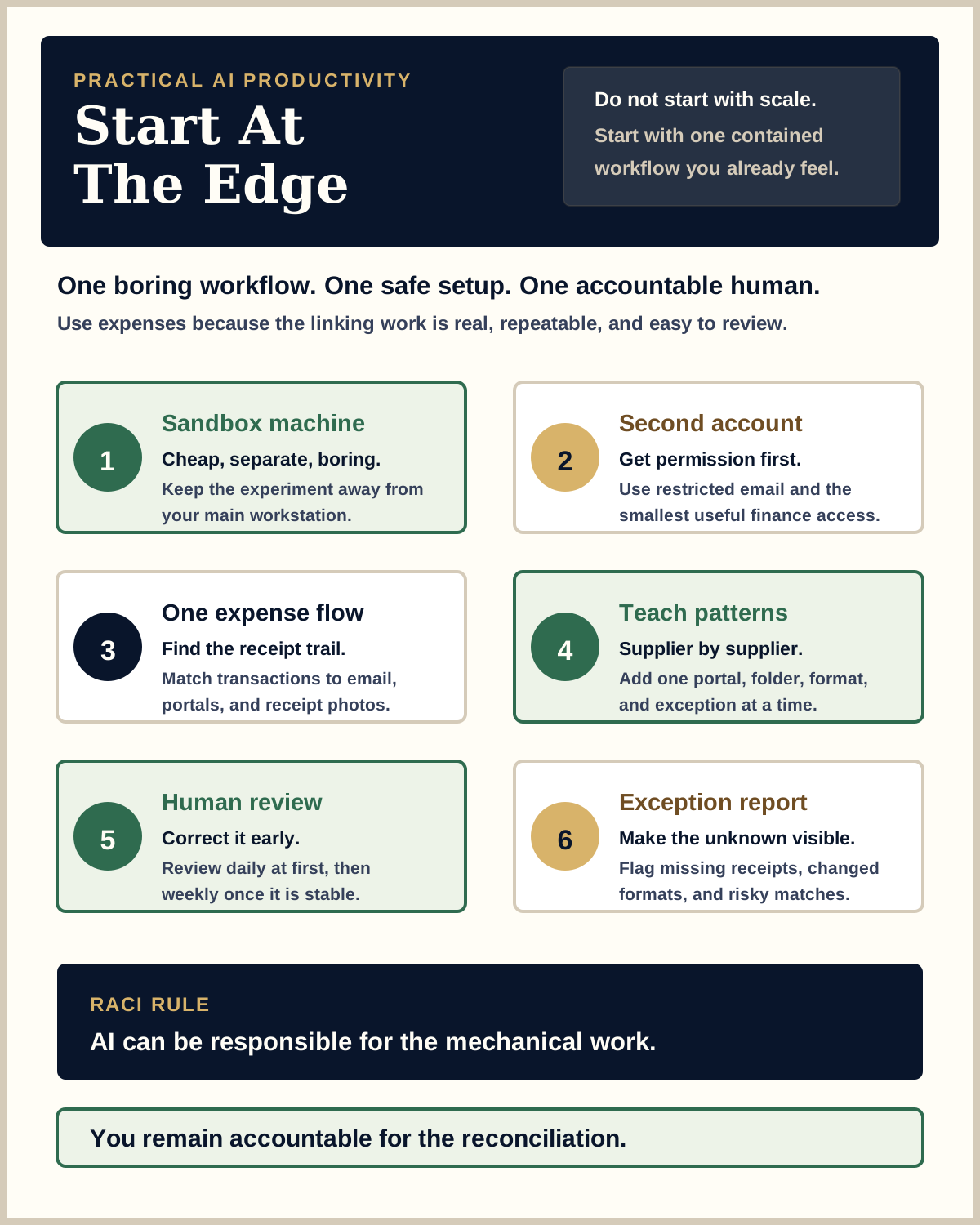
Start With A Small Sandbox
The first move is not clever automation. It is containment.
Use a cheap, separate machine. It could be a second-hand Mac mini. It could be another small computer that can run the tools you need. The point is to stop the experiment from sprawling across your main work machine, your main inbox, and every system you touch.
Then use a second business email account or mailbox. Get permission. Make it explicit. Give it a narrow job.
The rule is simple: if you cannot explain what access the AI worker has, the setup is not ready.
Use Expenses Because They Are Boring And Real
Expenses are useful because they are not glamorous. They are repetitive, fiddly, and full of small linking work.
The hard bit is often not the final accounting entry. The hard bit is finding the receipt, matching it to the transaction, knowing which supplier portal holds the download, remembering which photo folder has the restaurant bill, and spotting the thing that does not quite line up.
That is exactly the kind of edge work where AI starts to become practical.
Give the AI worker a narrow brief:
- Look at the transaction list it is allowed to see.
- Search the dedicated mailbox for receipts.
- Collect attachments when they are clearly receipts.
- Use approved supplier accounts where the access is limited to receipt retrieval.
- Check the receipt-photo folder when the purchase looks like something captured by phone.
- Attach the evidence to the reconciliation workflow.
- Report anything it cannot match.
Keep the access small. View-only where possible. Reconciliation-only where possible. If the only option is broad banking, payroll, HR, or production access, choose another first workflow.
Teach It Supplier By Supplier
This is the part people underestimate.
You do not need the whole expense universe solved on Monday morning. You need one supplier solved properly. Then another. Then another.
Maybe the first supplier emails a receipt as a PDF. Easy. Teach that pattern.
Maybe the second supplier needs the AI worker to open a portal that is already logged in on the sandbox machine, go to the receipts page, download the latest invoice, and attach it. Teach that pattern.
Maybe taxis need a different account. Maybe restaurants mostly live in a receipt-photo folder. Maybe one supplier changes the format of its emails and suddenly the pattern breaks.
Good. That is the work. You are building a set of small operational memories, not trying to magic away the process.
Keep The Human In The Loop
This only works if you review it.
In the first week, set aside time every day. Look at what it matched. Look at what it missed. Correct the pattern. Explain the exception. Tighten the instruction.
After that, move to a weekly review when the workflow is stable. But do not abdicate it.
The AI worker can be responsible for the mechanical work. You are accountable for the reconciliation. That means you still approve it. You still check the exceptions. You still notice when a supplier changes its format or when a transaction does not belong where the system put it.
This is not a governance document sitting somewhere on the intranet. This is accountability at the point of work.
This Is AI At The Edge
AI at the edge is not a slogan. It is what happens when the person who actually feels the friction starts teaching the machine the work.
You do not begin by asking a central team to automate your life for you. You begin by understanding the task well enough to delegate the mechanical parts and keep the judgement visible.
That change matters. It turns AI from something abstract into a practical operating habit.
Ask it to do one thing. Watch it. Correct it. Add one supplier. Add one exception rule. Add one folder. Add one safe account. Bit by bit, the edge starts moving.
The Starting Point
The starting point is deliberately small.
One machine. One second account. One workflow. One review rhythm. One clear accountability line.
Do that, and you will learn more about AI productivity than you will from another abstract conversation about transformation.
Start at the edge. Keep it safe. Teach it patiently. Stay accountable.