
I was putting together a document for a meeting.
Nothing dramatic. Just the normal useful stuff.
Who is coming? What are we doing? Where is the meeting? What is the point of the conversation? What have I already said? What do I need to remember? What should I ask? What would good look like by the end?
My first instinct was automatic.
I will put it in a Word document.
Or maybe a Google Doc.
That is what you do, is it not? You have a document, so you reach for the document-shaped thing.
Then I stopped.
I realised I was not creating something for a committee to mark up. I was not sending it around for redlines. Nobody needed to leave comments in the margin. Nobody needed track changes. Nobody needed the document to look official.
I was creating something for myself and my agents to work with.
And that changed the answer.
The old reflex
The old reflex is understandable.
For years, "document" has meant Word, Google Docs, Pages, or something similar. If you grew up inside organisations, that reflex is almost muscle memory.
Meeting note? Word document.
Policy? Word document.
Briefing pack? Word document.
Something important? Make it look like a document.
There is nothing wrong with that when the next worker is a human collaborator. Word and Google Docs are very good at a particular job: shared human editing, comments, suggestions, track changes, corporate templates, legal formatting, approval trails, and printing something that looks the way the organisation expects.
But that was not the job I had.
The job was: give me a working surface that I can regenerate, read, search, link, version, and hand to an agent without wrapping it in extra ceremony.
That is a different kind of document.
Who is the next worker?
This is now the question I ask before choosing a file format.
Who is the next worker?
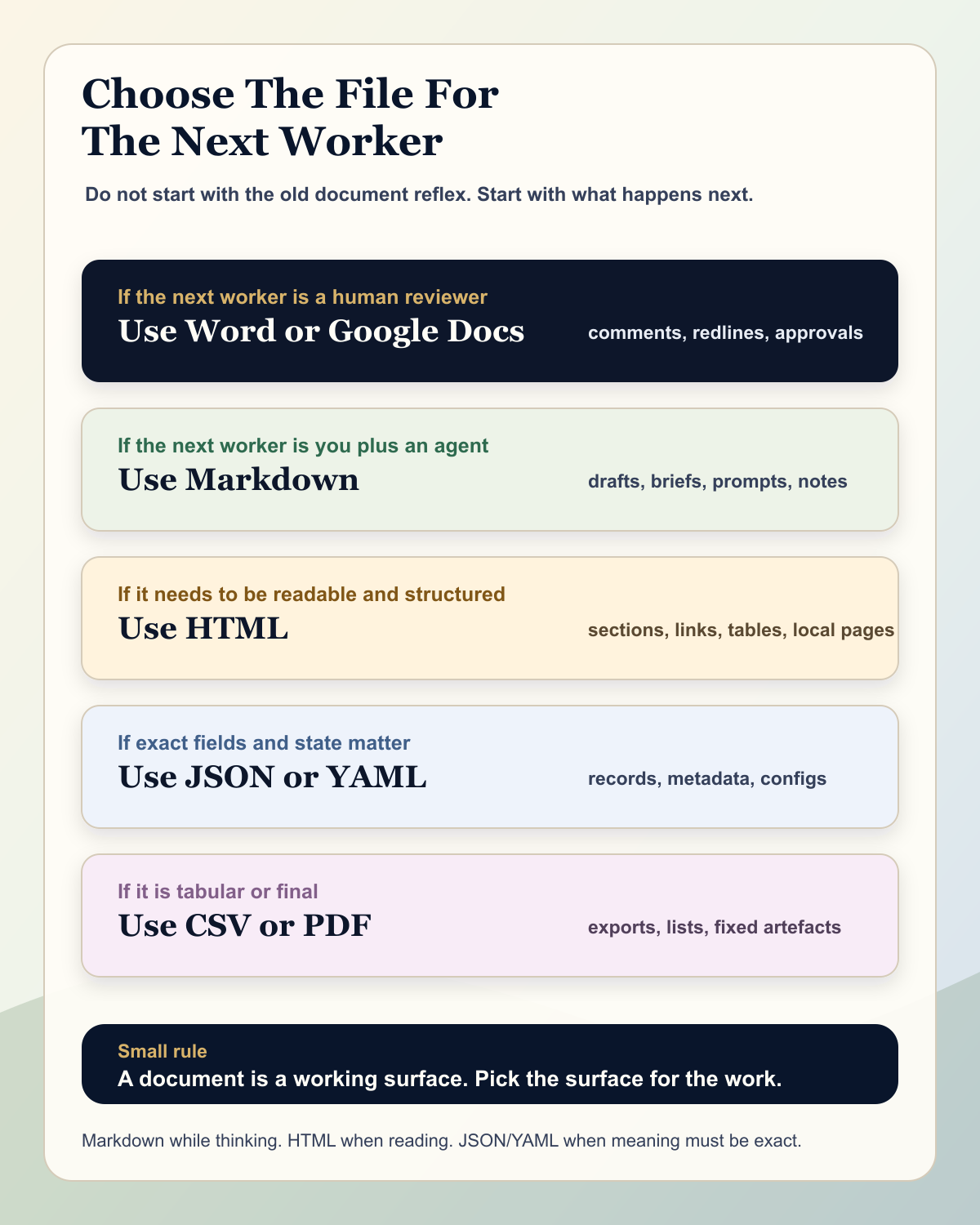
If the next worker is a person who needs to edit in a familiar office tool, use the office tool.
If the next worker is a board pack process, a legal review, a procurement template, or a client who expects comments and tracked changes, use Word or Google Docs. Do not be clever for the sake of it.
But if the next worker is you plus an agent, the answer may be different.
If I am going to ask Codex, Claude Code, ChatGPT, or another agentic tool to read it, refine it, split it, index it, rewrite it, search it, compare it, patch it, or turn it into another output, I probably want something simpler and more inspectable.
Markdown.
HTML.
JSON.
YAML.
CSV.
Plain text.
Not always. But much more often than my old reflex admits.
Why HTML suddenly made sense
For this meeting brief, HTML made a strange amount of sense.
It is light. It is fast. It is readable by a browser. It can have headings, sections, links, tables, lists, metadata, and embedded context. It can sit in a file system. It can be opened locally. It can be indexed. It can be searched. It can be regenerated. It can be copied into another system. It can be styled later if it needs to look better.
It is also not a black box.
An agent can read the structure. A human can open it. A script can change it. Git can show what changed. A browser can render it. Another system can turn it into PDF, Markdown, email, or a web page.
That is powerful.
The funny thing is that HTML is not exotic. It is the basic language of the web. MDN describes it as the thing that defines the meaning and structure of web content. That is exactly what I wanted: meaning and structure, without the weight of an office document.
So I had this small moment of, hang on, why am I reaching for Word?
Maybe it should just be HTML.
Markdown is often the better rough surface
HTML is not always the right answer.
For rough thinking, Markdown is often better.
Markdown is plain text for structured documents. That is the important bit. It gives you headings, lists, links, code blocks, emphasis, and a readable page without forcing you to write tags around everything.
If I am capturing meeting notes, project context, prompts, draft ideas, or a working brief that will change many times, Markdown is usually a lovely first surface.
It is easy to read in raw form. It works well in Git. It is easy for agents to patch. It is easy to search with normal tools. It does not care whether I am in VS Code, Codex, a terminal, Obsidian, a static site generator, or a plain text editor.
That matters because agentic work is often file-native.
You want the agent to be able to move through a folder, find the source, inspect the relevant section, edit the right paragraph, and leave a clean diff. Markdown makes that wonderfully boring.
Word is not wrong. It is a different machine.
I do not want this to become a silly anti-Word argument.
Word is useful. Google Docs is useful. Office documents are not dumb. Modern DOCX files are structured documents, usually packaged as zipped XML parts. Microsoft's own Open XML documentation shows how even a minimal WordprocessingML document has a main document part and nested elements for document, body, paragraph, run, and text.
That is good engineering for a rich office document.
It is less good as the default place to store agentic working context.
Why?
Because the thing I need most of the time is not rich document behaviour. I need plain access.
I want to see the words. I want to diff the words. I want to patch the words. I want to link the words. I want to search the words. I want to regenerate the words.
When I use Word, I get a powerful human collaboration environment. When I use Markdown or HTML, I get a clearer working surface for humans, agents, scripts, and version control.
Both are useful.
The mistake is using one because of habit rather than because of the next worker.
A practical format guide
This is the guide I am starting to use.
| Format | Use it when | Be careful when |
|---|---|---|
| Markdown | You are writing notes, briefs, prompts, docs, project context, or drafts that humans and agents will edit. | You need complex layout, exact print formatting, comments, or tracked changes. |
| HTML | You want a self-contained readable page with semantic structure, links, tables, sections, and browser rendering. | The document is still very rough and would be easier to write in Markdown first. |
| JSON | You need strict structured data: records, metadata, IDs, states, settings, manifests, or API payloads. | Humans need to write long prose or maintain it casually. |
| YAML | You want human-friendly configuration or structured notes with named fields. | Whitespace, quoting, or ambiguous values could create mistakes. |
| CSV | You have simple tables, exports, lists, or spreadsheet-like data. | You need nested data, rich text, formulas, or clear meaning around each field. |
| Word or Google Docs | Humans need comments, suggestions, track changes, corporate templates, legal review, or familiar collaboration. | The document is mainly working context for agents, scripts, search, or version control. |
| You need a final fixed artefact for reading, sharing, signing, or preserving layout. | You expect agents or humans to keep editing the source. |
There is no single best format.
That is the point.
The right format depends on the work.
Structure beats cleverness
The research and current practice point in the same direction, but with an important caution.
Markdown, HTML, JSON, and YAML are useful because they make structure visible.
Anthropic's prompting guidance recommends clear instructions, examples, and explicit structure, including XML-style tags for complex prompts and long documents. OpenAI's API guidance also makes the separation of roles and instructions explicit. That does not mean every working document should be XML or JSON. It means structure helps.
There is also early research on file-native agentic systems suggesting that format alone is not magic. One 2026 study tested YAML, Markdown, JSON, and another compact notation across models and found the best architecture can depend on the model and the task. The broader lesson is sensible: do not worship the format. Design the working context.
So I would not say, "always use Markdown."
I would say, "make the structure easy to see."
For a human, that might be headings and a table.
For an agent, that might be stable sections, metadata, clear file names, source links, IDs, and explicit fields.
For a team, that might still be a Word document with comments because that is the coordination surface everyone understands.
The small rule
The rule I am taking from this is simple.
Do not start with the format.
Start with the worker.
Who needs to use this next?
What do they need to do with it?
Do they need to read, edit, review, approve, search, patch, index, publish, archive, or regenerate it?
If the answer is human review, use the human review tool.
If the answer is agentic working context, use a format that lets the agent and the human see the same structure without ceremony.
For me, that increasingly means Markdown while I am thinking, HTML when I want a readable structured page, JSON or YAML when I need meaning to be exact, and Word only when the collaboration surface genuinely needs Word.
It is a small shift.
But it changes the way I think about documents.
A document is not just something you write.
It is a working surface.
And in agentic work, the surface matters.
Sources and notes
This piece is informed by the CommonMark specification on Markdown as plain text for structured documents, MDN's description of HTML as structure and meaning for web content, Microsoft's Open XML documentation for WordprocessingML, Anthropic and OpenAI prompting guidance on structured context, and recent research on file-native agentic systems.