I have had a couple of tight weeks.
Projects. Deadlines. Travel for personal reasons. The normal human pile-up of things that all need attention at the same time.
And in the middle of it, I realised something about working with agentic systems that sounds small, but I think is going to matter a lot.
Agentic work needs quiet.
Not just because quiet is pleasant. Not because I have suddenly become precious about my working environment. It is because voice has become part of the operating system.
If you are working with agents all day, you are not only typing prompts. You are speaking. You are correcting. You are switching. You are moving between machines. You are asking one agent to check something while another agent is doing something else. You are giving names, acronyms, project terms, file names, routes, and short instructions that need to land correctly.
That changes the workstation.
The train did not work
I tried to do proper agentic work on the train.
It did not work.
There was too much background noise. Too many voices. Too much movement. Too much interruption. The funny thing is that modern headphones are now very good at protecting the human. I can sit there with noise cancellation on and feel as if the world has been turned down.
But that is not the same as protecting the microphone.
The headphones help me hear.
The microphone decides what the agent hears.
That is the problem.
If I say a project name, an acronym, a customer name, a file name, or a term that means something inside my working system, the agent needs to hear it correctly. It needs to know whether I said the thing that matters or something vaguely similar. If it gets that wrong, it may go to the wrong context, show the wrong file, or start reasoning from the wrong place.
In ordinary dictation, a mistake is annoying.
In agentic work, a mistake can change the work.
My desk has changed
If you looked at my desk now, you would see that it has quietly turned into a voice workstation.
I have microphones for the machines I work on. I move between boxes. I move between agents. I move between screens. The microphone has to be ready when I switch, because the work is not one neat session in one neat application.
It is more like managing a small team.
One agent is building. Another is checking. Another is researching. Another is waiting for a decision. Another is on a different machine because that machine has the right environment or the right access.
That means I now work in silence much more often.
No lyrics in the background. No radio. No nearby conversation if I can avoid it. Not because I dislike sound, but because words in the room compete with the words I am trying to give to the system.
This is something I think a lot of people will discover the hard way.
Open offices were already difficult
Open offices were already a compromise.
We pretended, for years, that people could do deep work next to other people having calls, conversations, quick catch-ups, half-meetings, status updates, and "can I just grab you for a second?" interruptions.
The research on open-plan acoustics is not especially surprising if you have ever tried to write something complex while someone nearby is having a very interesting phone call. Studies of open-plan office sound repeatedly point to intelligible speech as one of the most distracting forms of background sound. Recent acoustic simulations also found that meaningful speech has a stronger effect on cognitive performance than less meaningful sound, and that more sound absorption can help.
Agentic work adds another layer.
It is not only that background speech distracts the person.
Background speech also contaminates the input channel.
So the office problem becomes a microphone problem, a transcription problem, a context problem, and a governance problem.
The agentic workstation is bigger than a laptop
I also think we are underestimating the visual side of this.
I use large screens because I need to see the state of the work. I have a 49-inch screen, a 32-inch screen, the laptop screen, and I can still imagine using more space because different agents and machines are doing different things.
When you are managing agentic work, the screen is not just a display.
It is the control surface.
You need to see what is running, what is waiting, what needs a decision, what has failed, what is safe, what needs review, and what can be ignored for the moment.
That is hard to do on a small laptop screen in a noisy environment while travelling.
It is also hard to do in an office that was designed around hot desks, one laptop, and the assumption that all important work happens inside a browser tab.
Physical machines still matter
In time, a lot of this will move to virtual machines, cloud workspaces, managed sandboxes, and remote servers.
That will be useful.
But right now, physical machines still have one very human advantage.
If something goes badly wrong, most people know how to turn a physical box off.
They can unplug it.
That sounds crude, but crude can be valuable. If a virtual server hits a bad loop, gets stuck, or needs low-level recovery, many people are suddenly in a world of dashboards, permissions, provider consoles, remote access, serial consoles, IPKVM-style tooling, or someone else's infrastructure team.
For experts, that is fine.
For normal agentic adoption, it is not nothing.
We should not assume that everyone is ready to manage invisible compute just because they can use an AI tool in a browser.
The laptop argument again
This reminds me of something I used to argue about in banking.
I wanted people to have excellent laptops.
Fast. Reliable. Proper screens. Proper memory. Proper tools.
That sounds obvious until you are in the budget conversation. Then someone says, quite reasonably, that it is a lot of money when you multiply it by a lot of people.
But the laptop is not a perk.
For many people, it is the working instrument. If it is slow, unreliable, underpowered, or awkward, you are not saving money. You are diminishing the person using it every day.
I think agentic work makes that even more true.
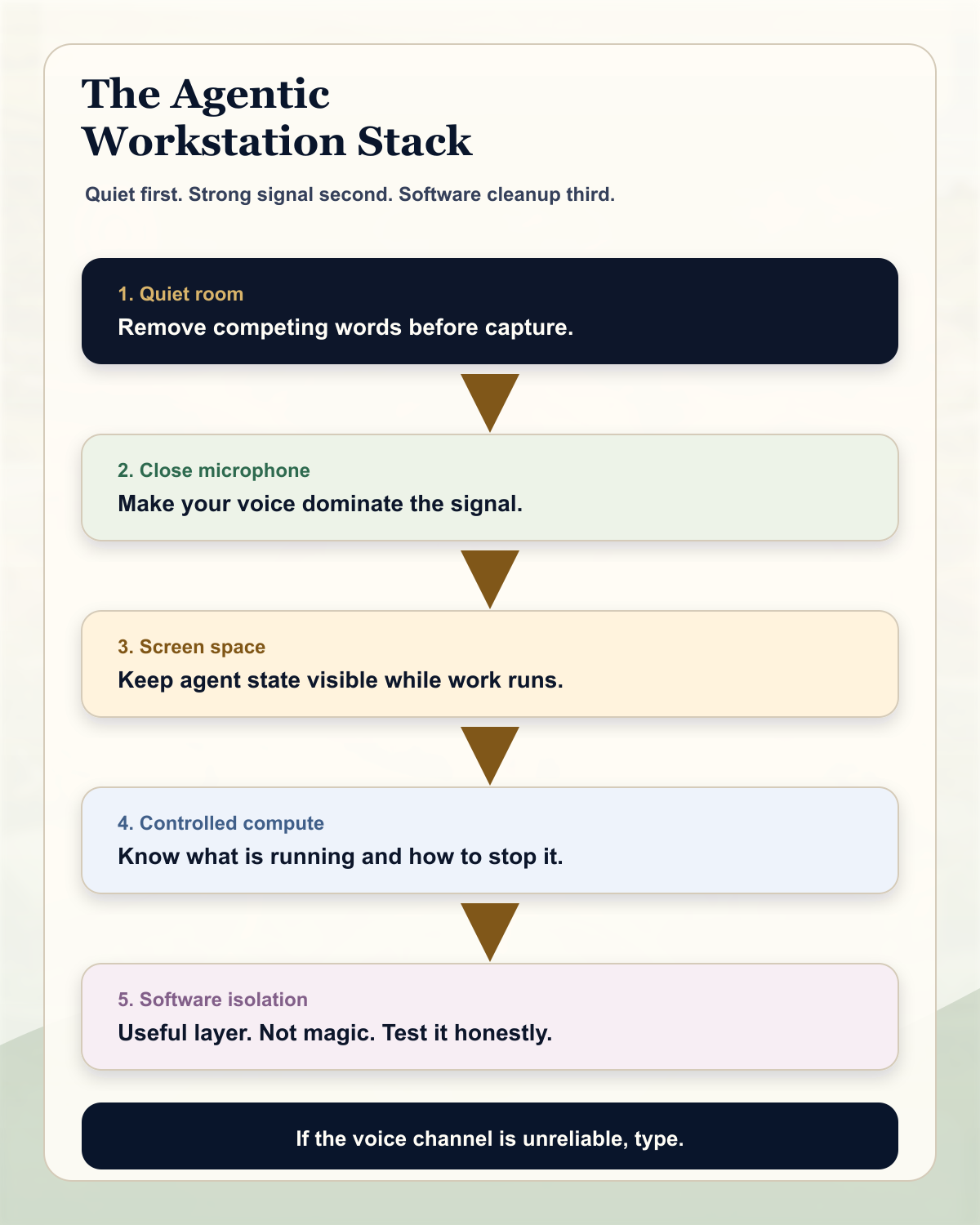
The workstation now includes the laptop, the screens, the microphones, the room, the network, the local machines, the cloud machines, the security model, and the human's ability to keep the whole thing in view.
That is the tooling.
If the tooling is poor, the human becomes the bottleneck in the worst possible way.
What might help now
I did a quick check on the practical options, because I am genuinely interested in what works here.
I would not treat any single microphone or headset as magic. Another person's voice close to your microphone is one of the hardest things to remove because it is also speech. The system has to keep your speech and reject other speech. That is a much harder problem than removing a fan, a train rumble, or steady background noise.
But there are layers worth testing.
| Layer | What it does | What I would test |
|---|---|---|
| Quiet room | Removes the problem before the microphone has to solve it. | Booked focus rooms, home office quiet blocks, no-lyrics work periods, and dedicated voice-agent spaces. |
| Close-talk boom mic | Makes your voice much stronger than the room. | Business headsets with boom microphones and strong call noise cancellation. |
| Open-office headset | Uses microphone arrays and processing to isolate the speaker. | Jabra Evolve2-style or Poly Voyager Focus-style headsets, especially those aimed at open-office calls. |
| High-noise mono headset | Prioritises speech pickup in road, warehouse, or field conditions. | BlueParrott-style headsets, while checking current availability and comfort for long desk use. |
| Software voice isolation | Filters sound after capture. | Apple Voice Isolation, Krisp, or meeting-tool suppression. Useful, but not a substitute for a good microphone and quiet space. |
| Private speech masks | Physically contains or isolates speech for extreme environments. | Stenomask or WhisperMask-style approaches. Interesting for the future, but not yet the normal office answer. |
| Typing | Avoids the audio channel entirely. | Use it on trains, tubes, planes, shared offices, and anywhere the voice channel is unreliable. |
Manufacturer pages are starting to describe exactly this problem. Jabra talks about ClearVoice microphones and background-sound blocking on the Evolve2 65 Flex. HP Poly describes the Voyager Focus 2 with Acoustic Fence technology and a Microsoft Open Office Premium microphone specification. BlueParrott's M300-XT SE page describes a high-noise mono headset with an 80 percent noise-cancelling microphone. Apple offers Voice Isolation on Mac in supported apps. Krisp offers software noise and background-voice cancellation, including custom vocabulary support for names and technical terms.
That last point matters.
For agentic work, it is not enough for the sentence to sound generally correct. The names, acronyms, routes, and weird internal words matter.
The office has to change
I think this is where the workplace conversation needs to go.
If companies want agentic productivity, they cannot simply give people access to an AI tool and put them back in a noisy office with a laptop, a headset, and a hot desk.
Some work will still be collaborative and loud. Some work should happen in rooms. Some work will happen on trains because life is messy and travel happens.
But serious voice-led agentic work needs something different.
Quiet rooms.
Good microphones.
Large screens.
Reliable machines.
Clear stop lines.
Enough space to see what the agents are doing.
That is not luxury.
It is the new workstation.
The small rule
The rule I am taking from this is simple.
If the environment is noisy, do not pretend the agent heard you properly.
Either move somewhere quiet, use a better close microphone, or type.
Agentic work rewards speed, but it punishes fuzzy input. When the words are the control surface, the room becomes part of the system.
That is the bit I had not fully appreciated until I tried to do the work while travelling.
Quiet is no longer just about concentration.
Quiet is infrastructure.
Sources and notes
This piece is a practical reflection, informed by research on open-plan office acoustics and by current product information from microphone, headset, and voice-isolation providers. Product references are examples to test, not endorsements.
- Auditory distraction in open-plan office environments: the effect of multi-talker acoustics
- Cognitive performance in open-plan office acoustic simulations
- Jabra Evolve2 65 Flex product information
- HP Poly Voyager Focus 2 product information
- BlueParrott M300-XT SE product information
- Apple Support: Use Mic Modes on your Mac
- Krisp voice isolation and noise cancellation information
- WhisperMask: A Noise Suppressive Mask-Type Microphone for Whisper Speech